Why do your Facebook ads keep getting disapproved? It’s frustrating to keep setting up new Facebook ad campaigns and they keep getting disapproved.
Especially after crafting the perfect ad, choosing the right Facebook ad targeting, setting your budget, and designing great visuals, only to receive that dreaded “Ad Disapproved” notification.
I know how important Facebook ads are to your business, whether you’re trying to target a mass affluent audience on Facebook, drive sales, or build brand awareness.
What could the problem be? Facebook’s ad policies are strict, and even a small mistake can get your ad rejected. Today, you’ll learn the 9 biggest reasons why Facebook disapproves ads, how these mistakes happen, and how you can fix them.
By the end of this, you’ll know how to get your ads approved, run smoother campaigns with better conversions.
9 Reasons Your Facebook Ads Are Getting Disapproved (and How to Fix Them)
- Violating Facebook’s Advertising Policies
- Violating Facebook’s Community Standards
- Repeatedly submitting disapproved Ads
- Using Banned Words or Phrases
- Misleading Content
- Political Advertising
- Bad Landing Page Experience
- Running Restricted Content
- Poor Ad Image Quality or Violating Image Rules
1. Violating Facebook’s Advertising Policies
Your ad doesn’t stand a chance at succeeding if you don’t follow Facebook’s Advertising policies. These policies are strict but easy to follow. Stick to them, and your ads will run smoothly.
These policies are there to protect the integrity of Facebook Advertising. They protect customers from unsafe practices, fraud or scams and ensure transparency. These policies also ensure continuous positive customer reviews.
Some common Facebook advertising policy violations include:
- Prohibited content (tobacco, adult products, weapons, etc.).
- Misleading claims (false promises, unrealistic guarantees).
- Discriminatory targeting (ads that single out race, gender, or personal attributes).
- Personal attributes (including information on avoiding assumptions about someone’s attributes in your ads).
If you keep violating policies, Facebook may permanently restrict your ad account. No one wants that.
How can you stay on the right side of Facebook Ad Policy?
- Always check Facebook’s Ad Policy before launching a campaign.
- Be honest and transparent in your ad messaging.
If you’re struggling with your Facebook ad campaign, read my guide on Common Mistakes in Facebook Ad Targeting That Cost You Money.
2. Violating Facebook’s Community Standards
Facebook regularly updates their community standards and guidelines according to everyday happenings in the world. These standards are meant to be inclusive and to ensure no party is offended by an ad.
Certain content is prohibited from being published whether as a post or ad. Since these standards are regularly updated, it’s important to familiarize yourself with them so your ad doesn’t get flagged.
Sometimes you might not have the intention to trespass, but a section of users or a community might find your content offensive. You must tread lightly.
Some content you can’t advertise on Facebook includes;
- Adult Sexual Exploitation
- Fraud, scams and deceptive practices
- Violence and incitement
- Bully and Harassment
- Suicide, self-injury and eating disorders
Follow Facebook’s community standards to the letter and you should be good to go.
3. Repeatedly Submitting Disapproved Ads
When your ad gets flagged or disapproved, it’s normal for you to feel bad or annoyed at wasted energy.
When you receive the disapproval notification, don’t be tempted to try again. Facebook didn’t make a mistake the first time, the problem lies with your ad.
Facebook flags accounts that keep submitting rejected ads without changes. It’s better to submit a review after your Facebook ad is rejected.
How can you submit a review after your Facebook Ads are rejected
The first step is to go to the Business support home on Facebook.
Here, you’ll see your Ad Accounts business page and will be able to check the Status of your rejected ads.
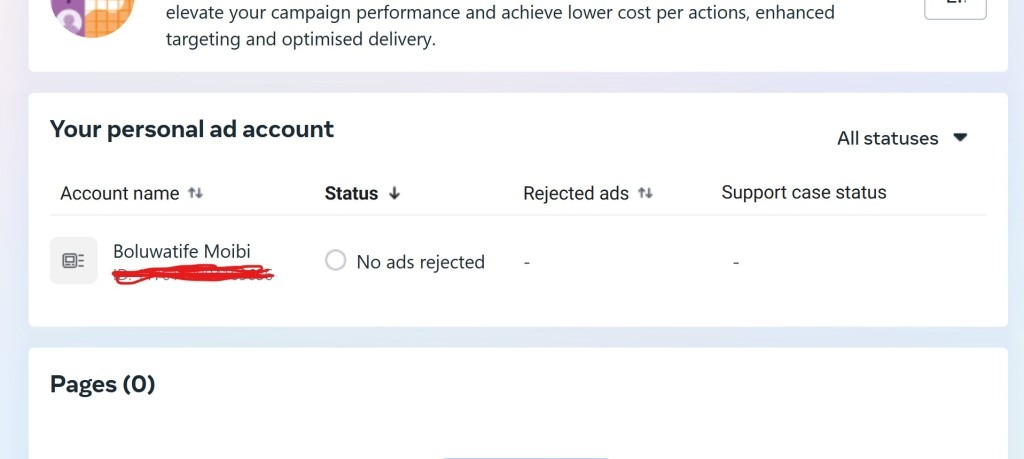
If your ad is rejected, you can submit an appeal for a review or for them to repeat the ad scrutiny process.
4. Using Banned Words or Phrases
Facebook scans your ad text and automatically disapproves ads that contain restricted words. If your ad contains unrealistic health claims, personal attribute violation or financial scam triggers, your ad would get disapproved.
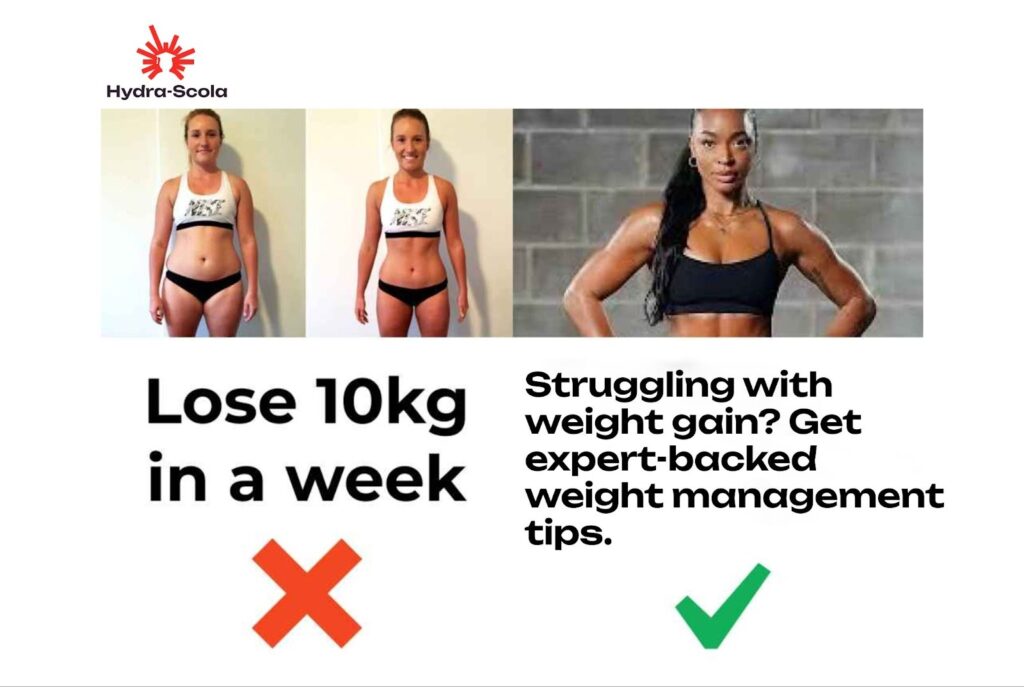
Examples of Banned Words:
- “Lose 10kg in a week!”
- “Are you struggling with debt?”
- “Make $10,000 overnight!”
You can fix this:
- Reword your ad copy to sound informative, not misleading.
- Instead of “Struggling with weight?”, try using this instead; “Get expert-backed weight management tips”.
5. Misleading Content
Facebook prefers that whatever is being advertised on their platform is for the good of the community. They cannot afford to be the bearer of misleading or deceptive content.
To checkmate this issue, ensure your ads are trustworthy and straightforward. Don’t overpromise,
Genuine content is king on Facebook. They try to maintain a space where everyone can trust what they see. Propose result-specific outcomes rather than vague tempting statements.
In short, your Ads shouldn’t deceive.
Don’t exaggerate too or use clickbait language, Facebook won’t approve it. Facebook penalizes accounts that submit misleading ads, reducing your reach and effectiveness.
Keep your ad copy clear and honest. If you want high-quality conversions, check out Reasons Your Facebook Ads Are Not Converting for deeper insights.
6. Political Advertising
Political advertising can instigate certain unwanted movements in different parts of the world. You can advertise electoral, political or social issues as long as it meets Meta’s legal requirements.
Understandably, Facebook considers itself a democratic establishment of the people, by the people and for the people. Hence, there’s no demand to directly influence the democratic process of the world.
7. Bad Landing Page Experience
Even if your ad looks great, a poor landing page can get it disapproved. If your ad promises something different from what’s on the landing page or your page is too slow, it can get your Facebook ad disapproved.
Your page must have valuable content and not look spammy. Your landing page is key in the Facebook ad approval process.
How can you optimize your Landing page experience for Facebook Ads
- Ensure your landing page matches the intent of your ad.
- Optimize for fast loading times and mobile-friendliness.
- Ensure your landing page loads quickly
- Remove any misleading element
- Have a clear call to action
8. Running Restricted Categories
Industries like cryptocurrency, health, and finance require special approval before running ads.
Apply for Facebook’s Business Verification to verify your business. Try to avoid banned financial and medical claims.
Try to follow industry-specific regulations for advertising restricted products or services on Facebook.
9. Poor Ad Image Quality or Violating Image Rules
Facebook has strict image guidelines, and violating them will get your ad disapproved. Some common issues you can encounter include;
- Too much text in images (Facebook prefers less than 20% text).
- Before-and-after images (not allowed for beauty or weight-loss ads).
- Misleading visuals (fake testimonials, exaggerated results).
Fix this by:
- Using clear, high-quality images.
- Avoiding text-heavy visuals.
- Check Facebook’s Text Overlay Tool before running an ad.
- Adopt an informational angle instead of Before-and-after images (for beauty and weight-loss ads)
- Avoid using exaggerated claims and fake testimonials
10. Targeting the Wrong Audience
If your targeting settings violate Facebook’s anti-discrimination policies, your ad won’t run.
Fix this by:
- Using Custom Audiences to reach the right people ethically.
- Learning more in our guide on Custom Audiences (Internal Link).
There you have it!
Key Takeaways: Avoiding Facebook Ad Mistakes
- Follow Facebook’s advertising policies to prevent disapproval and restrictions.
- Stay updated on community standards to avoid posting/advertising prohibited content.
- Don’t repeatedly submit disapproved ads; appeal, review and adjust before retrying the campaign.
- Avoid banned words, misleading claims, and exaggerated promises.
- Ensure landing pages match ad content, load quickly, and provide a good user experience.
- Use high-quality images with minimal text and no misleading visuals.
- Adhere to targeting rules to avoid discrimination policy violations.
Following these guidelines will help you run successful Facebook ads without issues.
Final Thoughts: How to Keep Your Ads Running Smoothly
Facebook ad disapprovals can be frustrating, but avoiding these mistakes will help you run high-performing campaigns.
Need expert tips? Check out:
- How to Target a Rich Audience on Facebook
- How to Run Facebook Ads for Your Business in Nigeria
- Important Metrics to Track When Running Facebook Ads
Frequently Asked Questions (FAQs)
1. Why does Facebook disapprove ad campaigns?
Facebook disapproves ads that violate its advertising policies, contain misleading claims, use banned words, link to low-quality landing pages, amongst other many reasons. Please read through their advertising policy page to get all the details.
2. How do I fix a disapproved Facebook ad?
Check the rejection reason in Facebook Ads Manager, edit your ad to comply with policies, and resubmit it for review.
3. Can I appeal a disapproved Facebook ad?
Yes! Go to Account Quality > Appeal, provide details about why your ad should be approved, and request a manual review.
4. What happens if my ad keeps getting rejected?
If your ads are repeatedly disapproved, Facebook may limit or restrict your ad account, reducing your ability to advertise. Facebook may also penalise you by increasing your cost per actions on that ad account.
5. How long does it take Facebook to review a disapproved ad?
Most reviews take 24 – 48 hours, but appeals can take up to 7 days. I have seen someone that happened in less than 2 hours.

I write like I talk - curious, At Hydra-Scola, amongst other things, I obsess over why campaigns click.